Where’s My OLIVE YOUNG Barcode? | Just Shake Your Phone! How to Show Points & Coupons【Korea Travel】
A practical walkthrough of displaying your OLIVE YOUNG membership barcode, based on 7 years of actually using the app in Seoul
Covers the shake-to-open method, opening it from My Page, point accumulation, and useful Korean phrases for checkout
※ This article contains affiliate links.
📌 Before you start
This guide covers the app used in physical OLIVE YOUNG stores in Korea. If you’re shopping online from outside Korea, use OLIVE YOUNG Global instead.
After 7 years living in Seoul, I’ve pulled up my membership barcode at OLIVE YOUNG stores more times than I can count. Using coupons or points requires showing your barcode at checkout — but once you know the trick, it takes about 5 seconds.
📌 Bottom line: there are 2 ways to pull up your barcode
📱 Method ① (fastest)
With the app open
shake your phone
works on any screen
🔍 Method ② (guaranteed)
My Page →
멤버십 바코드
(tap this)
#Barcode
#Checkout
#KoreaTravel
#OliveYoungApp
- 📱 How to display your membership barcode by shaking your phone (fastest)
- 🔍 How to open your membership code from My Page (if shaking doesn’t work)
- ⚠️ What to check if shaking your phone doesn’t open the barcode
- 💬 Useful Korean phrases for checkout (coupons & points)
📲 New to the app? Start here first
This companion guide covers installing the app, logging in with KakaoTalk, and claiming both the sale-only coupon and the monthly membership coupon — with screenshots for every step.
- Why Bother Showing the Barcode? What You Actually Get
- 🔍 Method ② | Opening the Barcode from My Page (If Shaking Doesn’t Work)
- STEP 1|Tap “마이” (My) in the Bottom-Right
- STEP 2|Tap “멤버십 바코드” (Membership Barcode)
- STEP 3|Show the Barcode to Staff
- Summary | OLIVE YOUNG Barcode Checklist
- Frequently Asked Questions
Why Bother Showing the Barcode? What You Actually Get
Pulling up the barcode every time might feel like an extra step, but the benefits compound the more you do it.
🎁 Two reasons to always show your barcode
① You earn points on every purchase
OLIVE points and CJ ONE points accumulate based on your purchase amount. You can spend them as payment on your next trip to Korea.
② Your rank climbs with cumulative spending, unlocking better perks
The more you shop, the higher your membership rank climbs — and the monthly coupon discount grows along with your point earn rate.
🏅 Membership Ranks & What You Get
BABY
Right after signing up. You can already claim the monthly coupon
↓ spend more
BRONZE
Coupon discount and point earn rate increase
↓ spend more
SILVER
Coupon amount and earn rate improve further
↓ spend more
GOLD
Rank-exclusive sales and higher-value coupons unlock
↓ spend more
PLATINUM and above
The top tier — the most generous perks and discounts
✅ The takeaway…
Just showing your barcode creates a positive loop: you earn points, your rank climbs, and future discounts get bigger. Even a single trip adds up — it’s worth building the habit of showing it every time. 😊
✅ Works from any screen!
As long as the app is open — home screen, a product page, anywhere — just shaking your phone brings up the barcode.
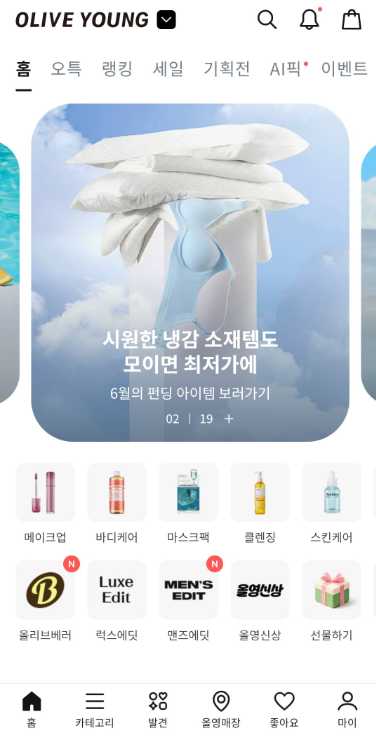
With the OLIVE YOUNG app open, give your phone a quick shake and the barcode pops up automatically. Just open the app and shake while you’re standing in line — you can have it ready before you even reach for your wallet.
📱 Tips for shaking it right
- Hold the phone upright and shake it 2–3 times quickly using your wrist
- Watch out for people standing near you 😊
- If it doesn’t respond, use Method ② below
🔍 Method ② | Opening the Barcode from My Page (If Shaking Doesn’t Work)
If shaking your phone doesn’t do anything, you can open the barcode directly from My Page instead. Three steps and you’re set.
STEP 1|Tap “마이” (My) in the Bottom-Right
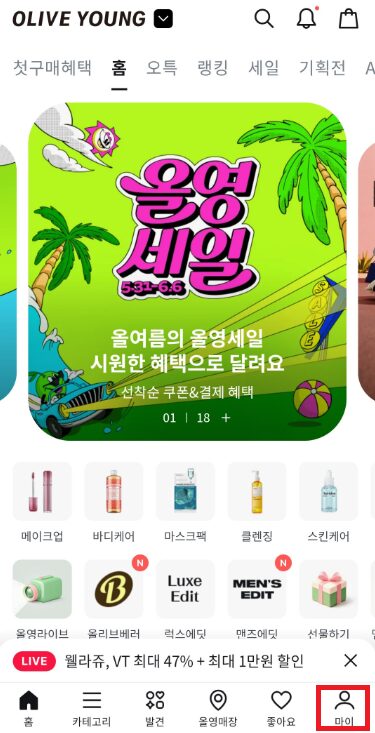
Tap the “마이” (My) icon (a person silhouette) in the bottom-right corner to open My Page.
STEP 2|Tap “멤버십 바코드” (Membership Barcode)
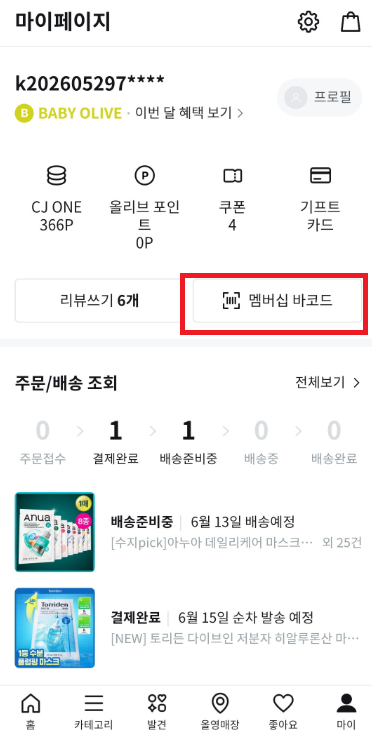
Tap the “멤버십 바코드” (Membership Barcode) button near the top of My Page.
👉 You can also check your coupon count and point balance right here.
STEP 3|Show the Barcode to Staff
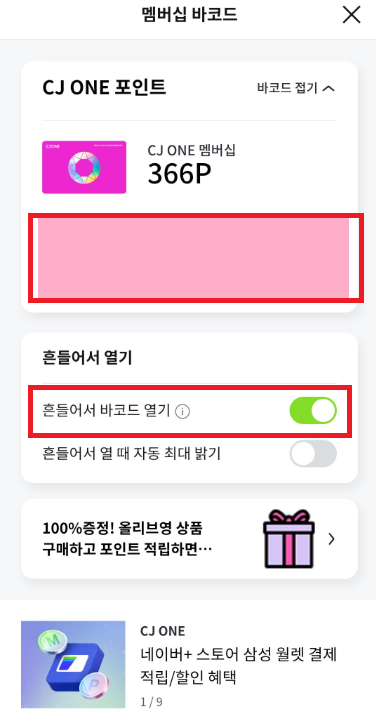
Once the barcode is displayed, hand your phone screen to the staff member to scan. If you’re using a coupon or points, say a quick phrase as you show it.
✅ Useful Korean phrases for checkout
- To use a coupon: “쿠폰 사용할게요” (kupon sayonghalgeyo)
- To use points: “포인트 사용할게요” (pointeu sayonghalgeyo)
- To earn points (no redemption): “포인트 적립해 주세요” (pointeu jeongnipae juseyo)
※ Just showing the screen is enough for staff to scan it — you don’t need to say anything in Korean if you’d rather not. 😊
⚠️ If shaking doesn’t open the barcode
Check whether “흔들어서 바코드 열기” (Open barcode by shaking) at the bottom of the barcode screen is toggled ON.
※ This is ON by default, so you shouldn’t normally need to change it. If it got switched off by accident, you can turn it back on here.
Summary | OLIVE YOUNG Barcode Checklist
- ① Have the app open (any screen works)
- ② Shake your phone and check whether your membership code appears
- ③ If it doesn’t: go to My → 멤버십 바코드 to open your membership code manually
- ④ Say “쿠폰 사용할게요” if you’re using a coupon
- ⑤ If shaking still doesn’t work, check that “흔들어서 바코드 열기” is toggled ON (see Step 3 for details)
Frequently Asked Questions
Q. Shaking my phone launched a different app instead
A. Make sure the OLIVE YOUNG app is in the foreground when you shake — if it’s running in the background, the shake gesture may not register. Try Method ② (opening it from My Page) instead.
Q. Can I use the barcode and a coupon at the same time?
A. The usual flow is: staff scans your membership barcode first, then you switch to the coupon screen for a second scan. Mentioning “쿠폰 사용할게요” when you first show your barcode makes the process go smoothly.
Q. Do I need to be logged in to use the barcode?
A. Yes, displaying the barcode requires being logged in. If you have a KakaoTalk account, logging in takes seconds. It’s worth logging in ahead of time before you head to the store.
Q. What’s the difference between CJ ONE points and OLIVE points?
A. Both appear on the barcode screen. CJ ONE points are a shared point system across CJ Group brands, while OLIVE points are specific to OLIVE YOUNG. Both can be used and earned at checkout.
Q. Can I use the membership barcode without a Korean phone number?
A. If you log in with a KakaoTalk account, a Korean phone number isn’t required. KakaoTalk works fine with a non-Korean phone number too, so setting up a KakaoTalk account before your trip makes things simpler.
Q. Do points still accumulate for tourists, not just Korean residents?
A. Yes. As long as you have an account, OLIVE points and CJ ONE points accumulate regardless of nationality. They carry over to your next trip to Korea too, so it’s worth making a habit of showing your barcode.
Q. Do I need to register as a member to use coupons?
A. Yes, claiming and using coupons requires an account (login). With KakaoTalk, logging in takes under a minute. It’s worth installing the app and logging in before your trip, even if you don’t set anything else up.